Skip to content
New Year Savings Event - Get up to 50% off
Schedule a Call with Sales
Hivelocity_logo_redblk
  • Products
    • ---
      • Dedicated Servers 50+ global data centers ready to deploy
        from
      • VPS Hosting Industry leading price per performance
        from
      • VDS HostingEnhanced performance and flexibility
        from
    • ---
      • Enterprise Cloud
        Powered by VMware’s industry
        leading virtualization technology
        Enterprise Cloud
        Powered by VMware’s industry
        leading virtualization technology
        Learn More
      • Colocation
        Your infrastructure without
        constraints
        Colocation
        Your infrastructure without
        constraints
        Learn More
  • Solutions
    • ---
      • Financial services
      • Ad Serving
    • ---
      • Partner program
  • Services
    • ---
      • Data Migration
      • Server Management
      • DDoS Protection
      • Firewall
    • ---
      • Backups
      • Cloud Object Storage
      • Colo-Cloud Backup
      • Solution Portability
  • Data Centers
    • ---
      • Data Center Locations 50+ data centers across 6 continents
      • Network Looking Glass Test our network
      • Service StatusView our current up-time report
    • ---
      • Data centers map
  • Developers
    • ---
      • API ReferencePurchase, deploy and manage with our API
      • Product DocsGet a deeper understanding of our products
      • Terraform ProviderTerraform provider for Hivelocity
  • Pricing
  • Support
  • Log In
Your Webhosting Questions
Answered by the Webhosting Experts
See where the internet lives
Back to: Account
Create a Free Account
Chat with an Expert
Configure a Bare Metal Server
Latest
Categories +
  • Account
...
  • Account
  • Applications
  • Compute
  • Database
  • Dedicated Server
  • Developers
  • Enterprise Cloud
  • Network
  • Security
  • Storage
  • System
  • VPS

Creating PTR/rDNS Records in the MyV Customer Portal

Creating PTR (Pointer) records, also known as reverse DNS (rDNS) records, in the myV Customer Portal is a crucial step in managing how your domain’s IP addresses are resolved back to your domain name. These records ensure that when someone performs a reverse lookup on your IP address, it correctly maps to your domain. Setting up PTR (rDNS) records can improve email deliverability, assist with network troubleshooting, and enhance your domain’s reputation. This guide will walk you through the process of configuring these records within the myV Customer Portal.

Creating the PTR Record in MyVelocity

To create the PTR record, proceed with the following steps.

  1. First, head over to Hivelocity.net and log in to myVelocity.
  2. Once you’ve gone through the login process. The screen below will appear, listing all of your current devices such as below.
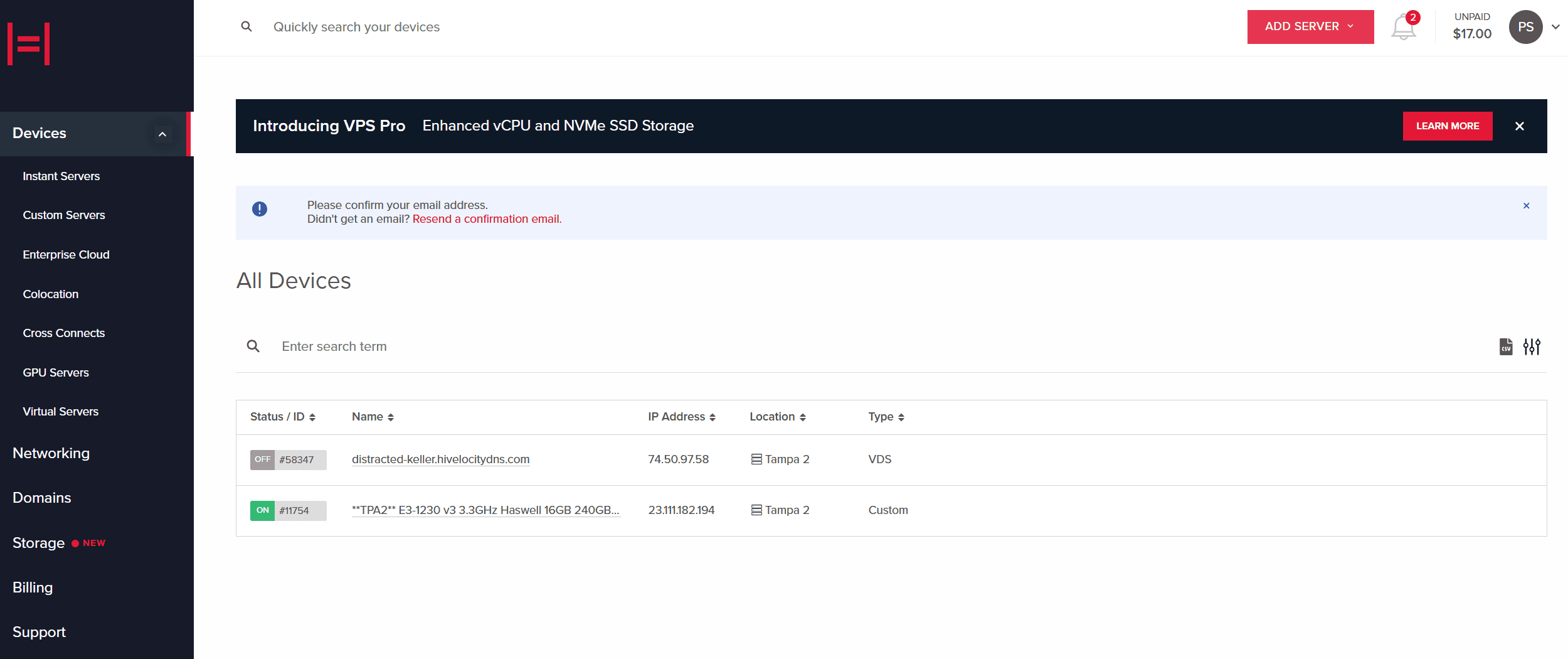
     

    Devices Overview Page
    Devices Overview Page
  3.  Within the main page, proceed to select the “Networking” Tab, followed by the “PTR Records” tab as shown below.
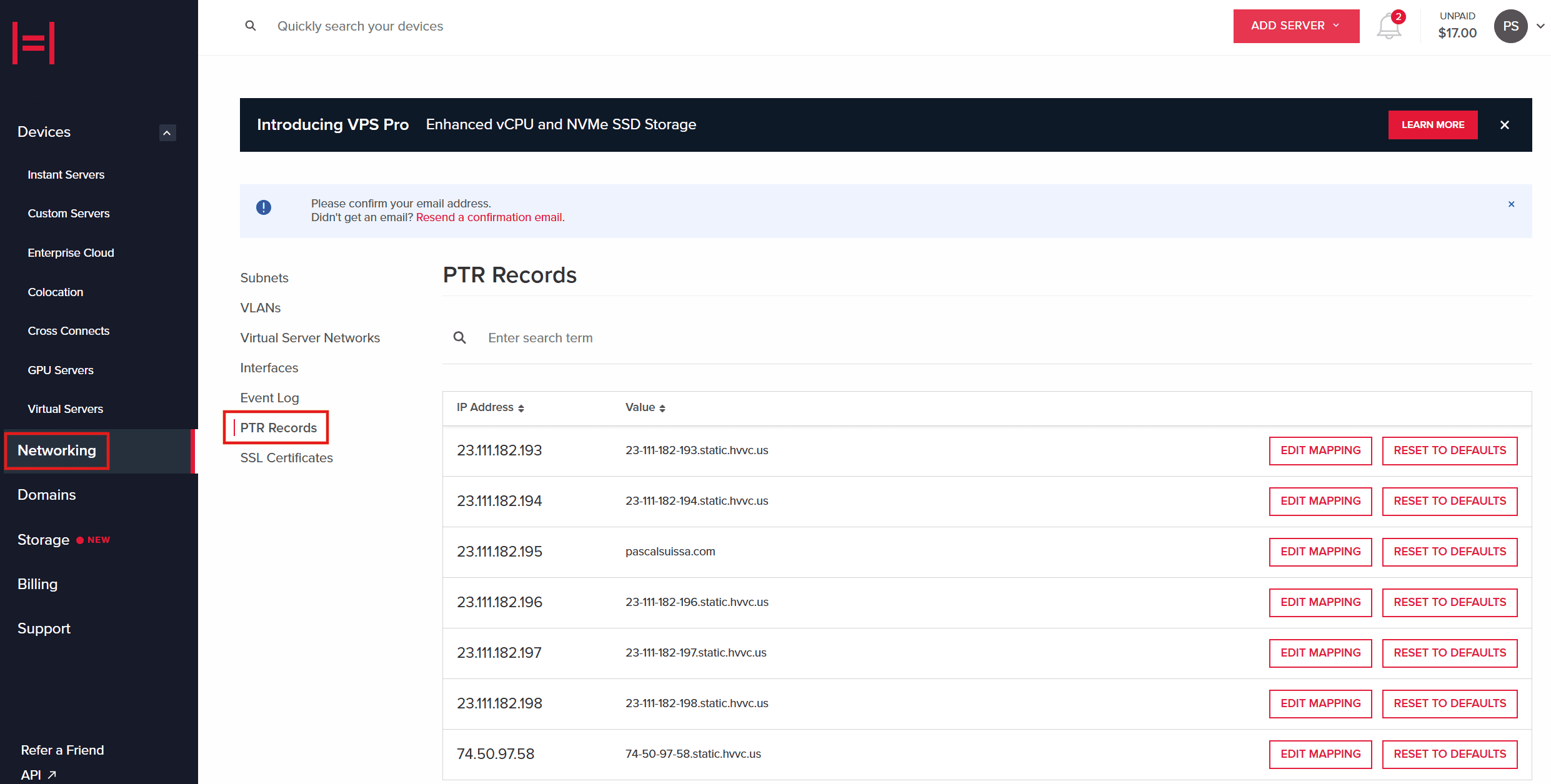
    PTR Records in MyV
    PTR Records in MyV
  4. In the “PTR Records” page, you can then proceed to edit the mapping of each IP address to the value of choice. Example image shown below.


    NOTE
    : Before creating a PTR (reverse DNS) record, ensure that the corresponding A record (forward DNS) already exists. The A record should be created in the DNS management interface where your domain’s DNS records are hosted.
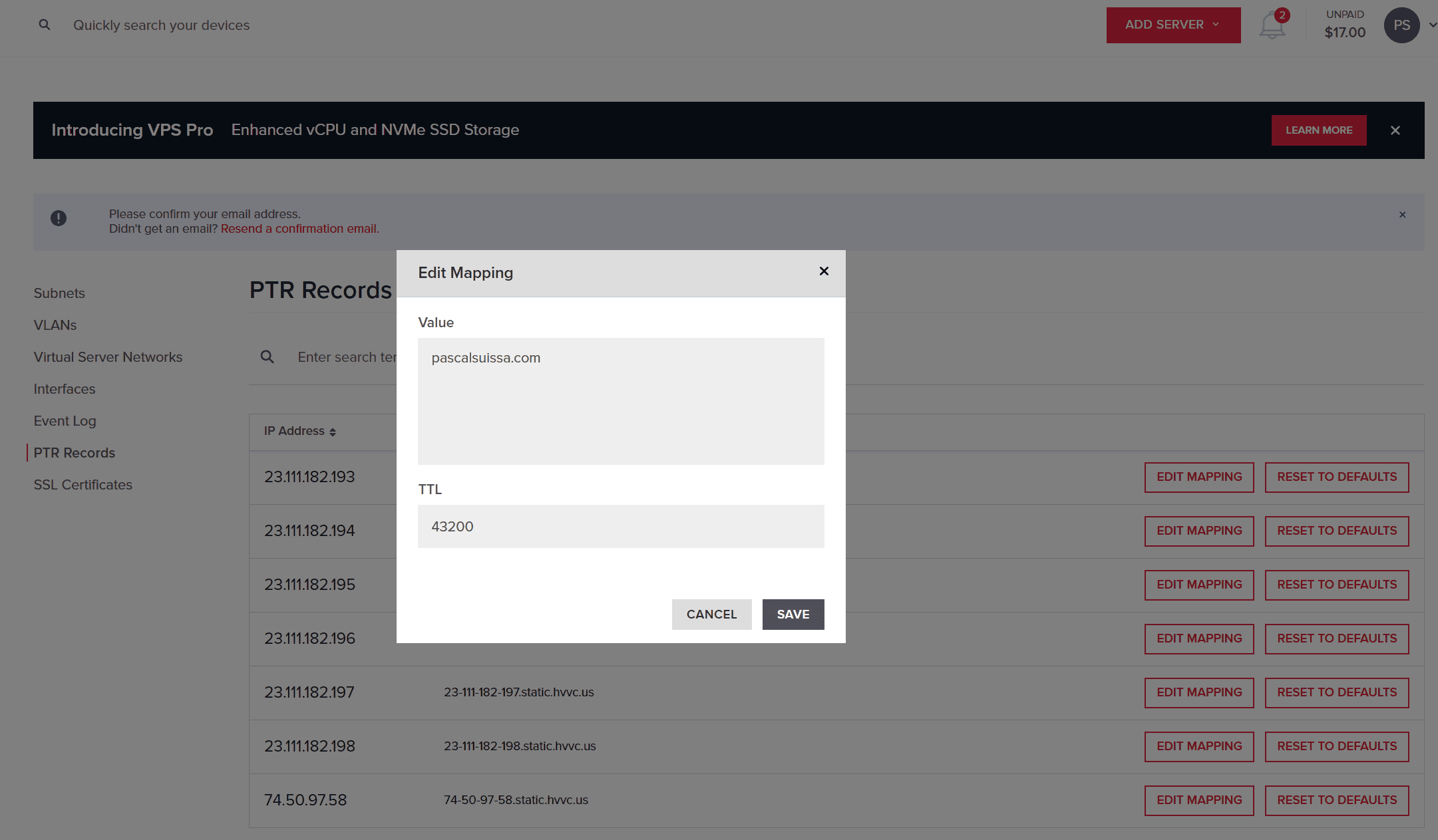
    PTR Record Modification
    PTR Record Modification
  5. Once the value has been modified ensure to press the “SAVE” button. The propagation shouldn’t take too long however officially it can take anywhere from 24 to 48 hours for these changes to propagate globally, though in some cases, it can take up to 72 hours. 
  6. If you ever require resetting the value to the default you can return to the page and press on “RESET TO DEFAULTS”.

Reviewing Record Propagation

Record propagation can be checked through various DNS record checking such as dnschecker or in your OS terminal such as below with the dig -x <IP_ADDRESS> command.
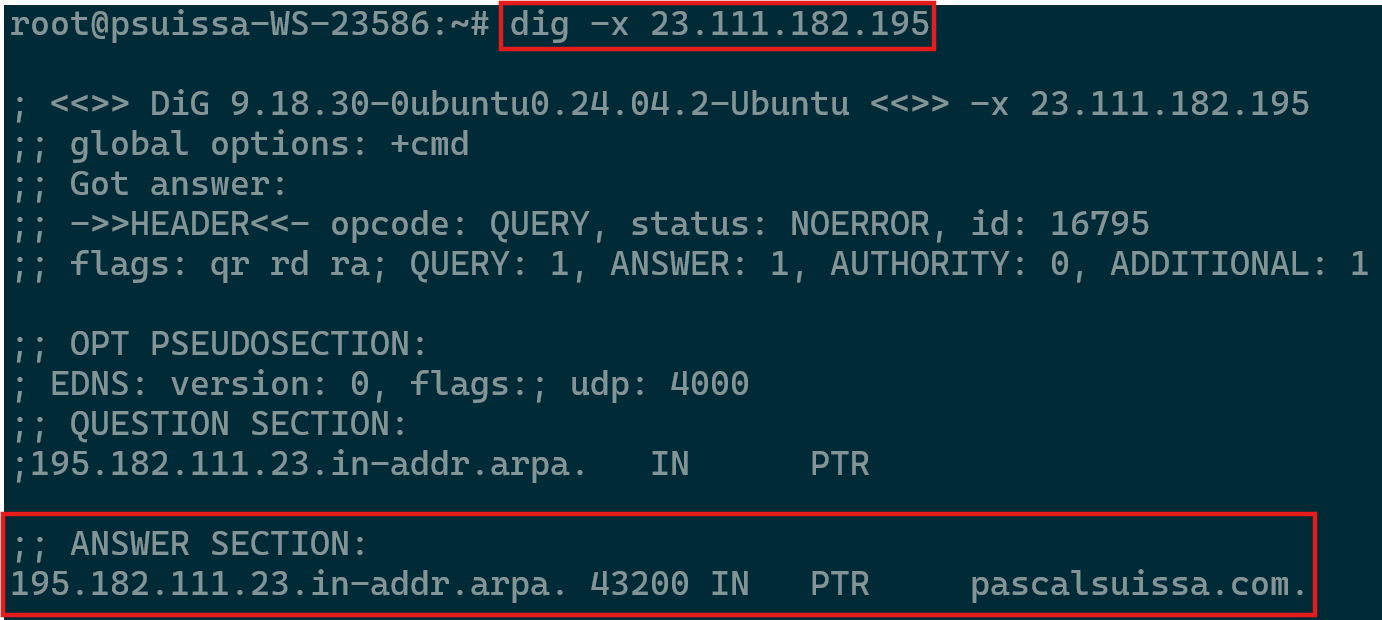
Reviewing Propagation

Special Cases Require Escalation 

  • For cases involving IPv6 PTR Records, please proceed to contact the Support department to manually create it.
  • In rare cases that the IPv4 is missing in the portal within the “PTR Records” page, please proceed to contact the Support department as they will need to generate it.

Further Assistance

For any further assistance involving PTR records, do not hesitate to reach out to the Hivelocity Support team via a chat, support ticket, or phone at 888-869-4678. 

-Written by Pascal Suissa

Need More Personalized Help?

If you have any further issues, questions, or would like some assistance checking on this or anything else, please reach out to us from your my.hivelocity.net account and provide your server credentials within the encrypted field for the best possible security and support.

If you are unable to reach your my.hivelocity.net account or if you are on the go, please reach out from your valid my.hivelocity.net account email to us here at: support@hivelocity.net. We are also available to you through our phone and live chat system 24/7/365.

What type of server do you need?
see all

Virtual Private Servers

Enjoy scalable resources and affordability - ideal for growing projects that don’t need fully dedicated resources.

see all

Dedicated Servers

Full control, high performance, and maximum security with servers that are 100% yours

see all

Enterprise Cloud

Scalable, secure infrastructure built for businesses that need high availability and custom architecture.

  • Products & Solutions
  • Dedicated Servers
  • Enterprise Cloud
  • VDS Hosting
  • VPS Hosting
  • Colocation
  • Storage Servers
  • Game Server Solutions
  • Solana Validator
  • Ollama Hosting
  • Custom Solutions
  • Services
  • Disaster Recovery
  • Cloud Connect Backup & Replication
  • Colo-Cloud Backup & Recovery
  • Data Migration
  • Server Management
  • DDoS Protection
  • Firewall
  • Rapid Restore
  • cPanel Flat Rate Pricing
  • Unmetered Ports
  • SSL Certificates
  • Portability Program
  • Resources
  • myVelocity Portal
  • API Documentation
  • Knowledge Base
  • Looking Glass Network
  • Case Studies
  • Blog & News
  • Competitor Comparison
  • Hivelocity Reviews
  • Company
  • About Us
  • Events
  • Data Center Locations
  • Our Team
  • Careers
  • Partner Program
  • Customer Referral
  • Bug Bounty Program
  • Contact Us
Deploy in minutes.
Create a free account to get started.
Get Started
Follow us:
American ExpressVisaMastercardPaypalCrypto
© Hivelocity, Inc 2026. All rights reserved.
  • Legal Information
  • Privacy Notice
  • Terms of Service
  • Billing Agreement
  • Abuse
learn more